DayZ Inventory Plus
DayZ Inventory Plus UPDATE! 9/18/26 Added more classes for the transfer functions the mod was missing. Changed how the UI likes for the buttons and added them to attachments like pouches and medkits. One of the inventory button sets looks different from the others and that was the only way to get it to attach due to DayZ coding for those attachments. The drop down for the bar that looks different does drop down into… (more)
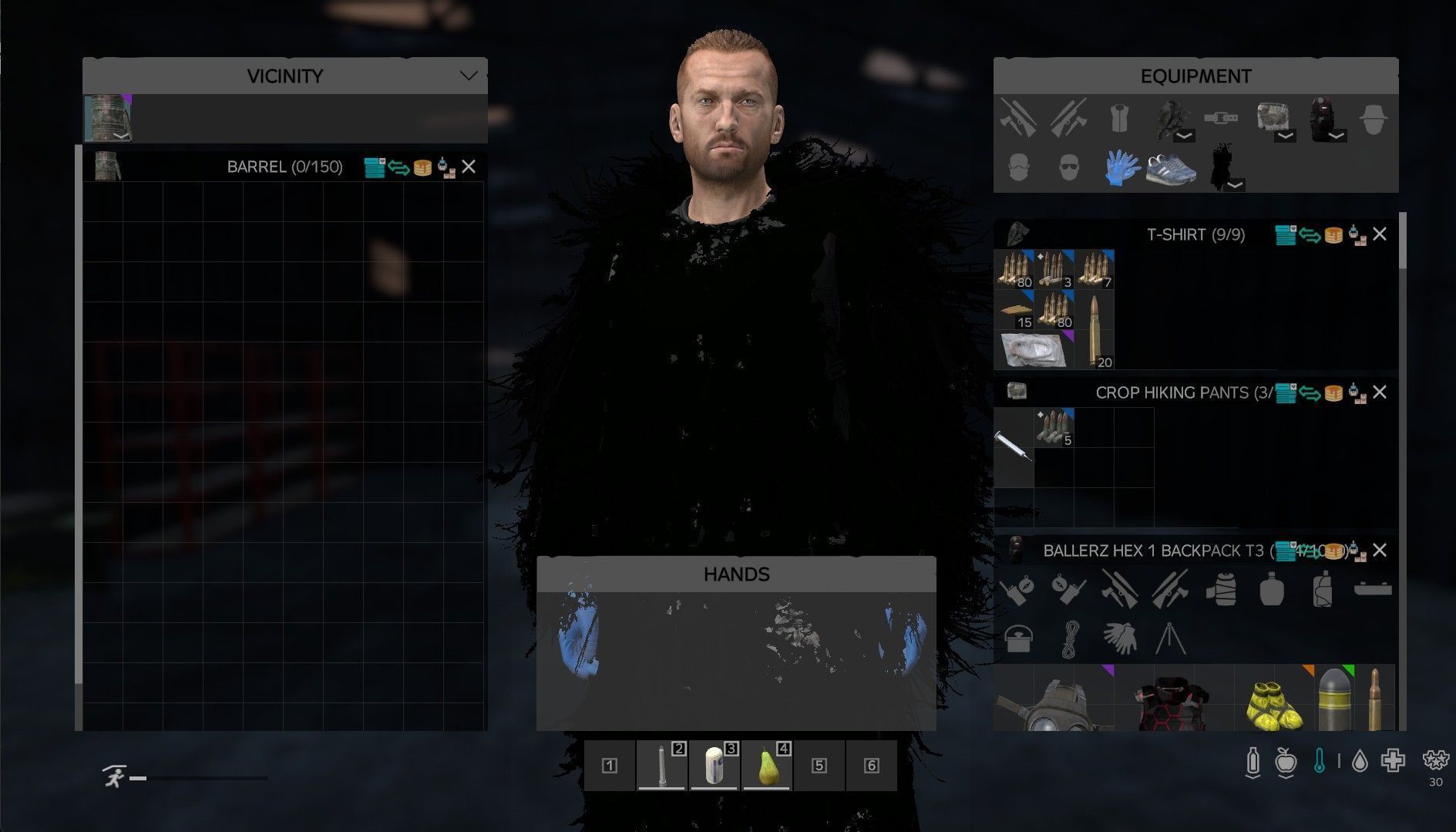
DayZ Inventory Plus UPDATE! 9/18/26 Added more classes for the transfer functions the mod was missing. Changed how the UI likes for the buttons and added them to attachments like pouches and medkits. One of the inventory button sets looks different from the others and that was the only way to get it to attach due to DayZ coding for those attachments. The drop down for the bar that looks different does drop down into the inventory but is clickable and will work, again DayZ coding limitations due to the way the header for those was coded. Add in tool tips for the buttons as well. Changed sorting order so that way clothes and weapons are sorted last instead. Changed transfer order where when you just press transfer it would go to the bottom most inventory, it now goes to the top most inventory and then down the list from there. Changed sorting functions so that it does 6 sorts as it does it to make it as tight as possible. Changed how the selection for transfer works as well to instead of needing select the header of the inventory you can just click inside the inventory to make it easier. DayZ Inventory Plus adds fast, practical inventory controls directly to container headers so players can manage gear with fewer clicks. It is built for players who want cleaner inventory management without constantly dragging items around by hand. This does make a JSON file for 3 different messages. 2 of them are set to be off when the file is made. Please read what the messages are. Buttons from left to right are filter(drop down menu), transfer(Arrows), stack(Stack of pancakes) and sort(boxes with claw). Features: -Sort button for quick container organization -Stack button for merging compatible stacks without a full sort -Transfer button for moving items between open containers -Category filters for selective transfer -Automatic destination detection for faster use -Manual destination selection when players want to choose the exact target container -Held item exclusion so specific items do not get moved -Held item category override for modded or unusual items -Server JSON settings for optional messages and joke countdown behavior Current Filters: -All -Clothing -Ammo -Mags -Medical -Food/Drinks -Attachments -Tools -Weapons -Misc Attachments filter supports items like: -scopes -suppressors -buttstocks -handguards -grips -lights -lasers -other attachment-style items How It Works Each supported inventory/container header gets extra buttons that let the player: Sort the current container Stack the current container Transfer items from the current container to another valid open container Select a filter to decide what gets transferred Transfer behavior If the player clicks a destination container header first, transfer will use that container If the player does not manually select a destination, the mod will auto-detect another valid open container Transfer only moves items that match the currently selected filter Player Controls: Sort Sorts the selected container. Stack Stacks compatible items in the selected container without doing a full reorganization. Transfer Moves items from the selected source container to another valid destination container. Filter Opens the filter menu and lets the player choose what category the transfer button will move. Exclude Held Prevents the currently held item type from being moved by transfer. Include Held Removes that exclusion so the held item type can be transferred again. Assign Held To Selected Assigns the currently held item type to the selected filter. Useful for: modded items items with odd classnames items landing in Misc when the player wants them somewhere else Clear Held Override Removes the custom category assignment from the currently held item. Example Use Cases Quick transfer Open two containers Pick a filter Press Transfer Transfer to a
Not analyzed yet
modperf has not read this mod's scripts, so there is no report and it is left out of any stack it appears in. 2 live servers in the crawl publish it.
The worker downloads the mod from the Workshop and reads its Enforce Script — nothing is executed. Usually a few minutes. This page then shows the report.