AirBallonEvents
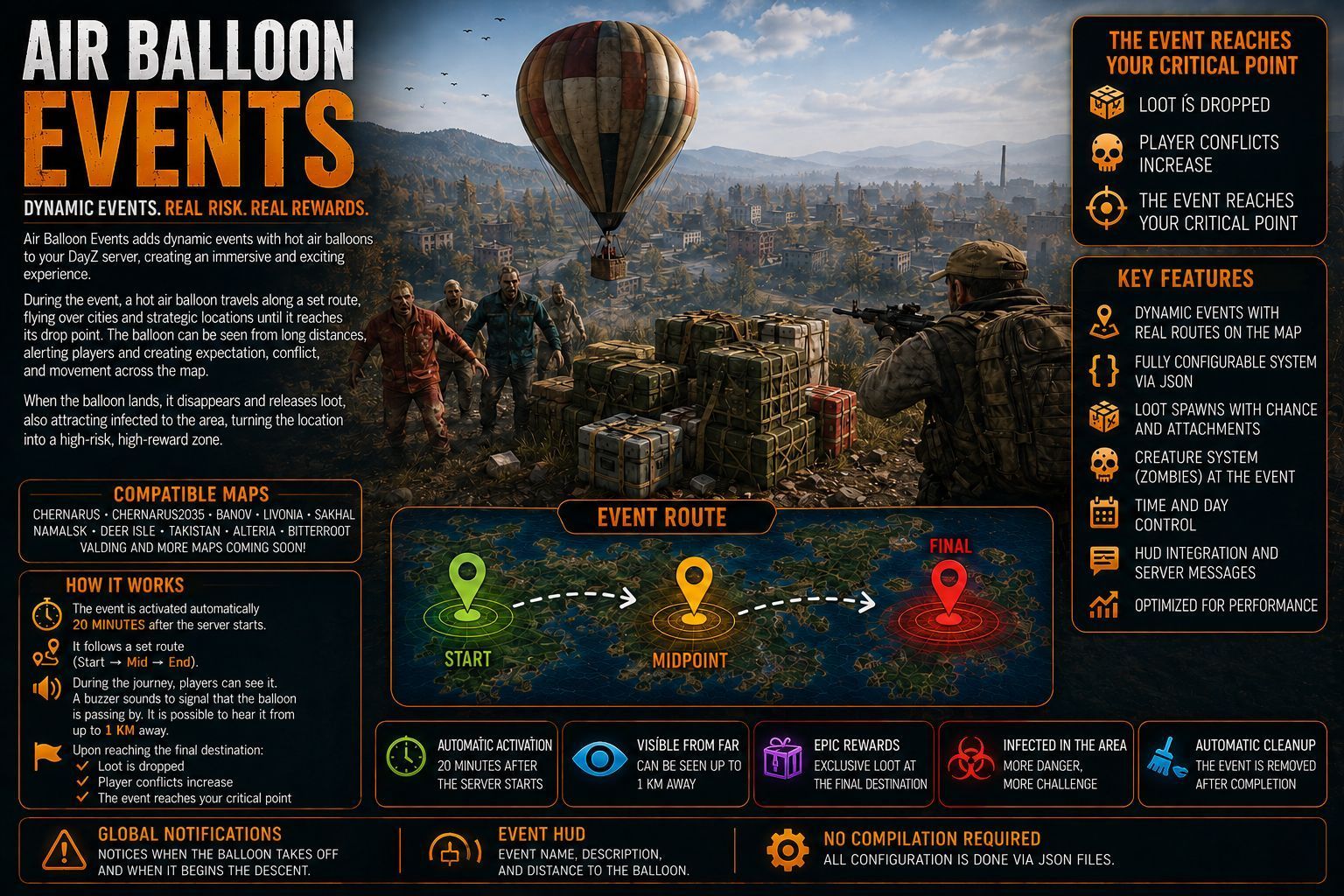
🎈 Air Balloon Events — Dynamic Balloon Events for DayZ 📌 DESCRIPTION This mod simply adds dynamic events with balloons from the Air Balloon mod to your DayZ server, creating a unique and immersive gameplay experience. During an event, a hot air balloon travels across the map following a predefined route, flying over cities and strategic locations until it reaches its landing point. The balloon can be seen from long… (more)
🎈 Air Balloon Events — Dynamic Balloon Events for DayZ 📌 DESCRIPTION This mod simply adds dynamic events with balloons from the Air Balloon mod to your DayZ server, creating a unique and immersive gameplay experience. During an event, a hot air balloon travels across the map following a predefined route, flying over cities and strategic locations until it reaches its landing point. The balloon can be seen from long distances, drawing players’ attention and creating anticipation, conflict, and map movement. Maps: Chernarus, Chernarus2035, Banov, Livonia, Sakhal, Namalsk, Nasdara, Deer Isle, Takistan, Alteria, Bitterroot, Valding, DayZone and TheZone. More maps coming soon. When the balloon lands, it disappears and spawns special loot, along with infected around the area, turning the location into a high-risk, high-reward event zone. This mod is ideal for: - encouraging exploration - creating player encounters - revitalizing rarely visited areas - adding meaningful world events to your server 🔔 FEATURES Multiple events configurable via JSON Fully customizable routes (start, mid, and landing points) Balloon visible from up to 1 km away Global notifications when: - the balloon starts its flight - the balloon begins its descent HUD display showing: - event name - short description - distance between the player and the balloon Configurable spawning of: - loot - infected - spawn radius Automatic cleanup after the event ends No recompilation required — all configuration is done via JSON Each event becomes a true attraction on the server, creating memorable moments for players. ⚙️ USAGE / CONFIGURATION When the server starts for the first time, a configuration file will be automatically created at: $profile:AirBallonEvents\Config.json All event behavior and settings are controlled through this file. 🧩 JSON CONFIGURATION EXPLANATION 🔧 Global Settings m_enable: Enables (1) or disables (0) the mod. m_touchdown_agl: Final landing height of the balloon (in meters). m_ascend_speed: Balloon ascent speed. m_cruise_agl: Balloon cruising altitude. m_cruise_speed: Horizontal flight speed. m_descend_speed: Balloon descent speed. m_interval: Time interval (in minutes) between the end of one event and the start of the next. m_debug_mode: Enables detailed debug logging (1 = enabled, 0 = disabled). m_log_interval: Defines the time interval during which the server will record the exact position (GPS X and Z coordinates) of the balloon in the mod's internal log file and in the .RPT console. Essential for administrators to track the event's route in real time. m_hud_interval: Defines the frequency with which all online players will receive an on-screen notification (HUD) informing them of the balloon's updated location. If set to a very low time, it can generate "spam" on players' screens; longer times keep the event mysterious but give a clue to the route. 🎯 Event Configuration (m_events) m_eventID: Unique identifier for the event. m_eventMessage: Message displayed to players when the event starts. m_eventDisplay: Event name shown on the HUD. m_eventDisplayColorARGB: HUD text color in ARGB format. 🗺️ Balloon Route m_Start: Balloon starting position. m_Mid: Midpoint of the route, used to create smoother flight paths. m_EndAir: Final air position before descent begins. m_EndGround: Exact landing location. Event Schedule: Days of the week when the event can occur (1 = Monday, 7 = Sunday). m_hourStart / m_hourEnd: Allowed time window for the event. 🎒 Event Loot m_classType: Item class name. m_quantityMax: Maximum quantity of the item. m_health: Item condition on spawn. m_chance: Spawn chance (0.0 to 1.0). m_attachments: Item attachments, if
Not analyzed yet
modperf has not read this mod's scripts, so there is no report and it is left out of any stack it appears in. 2 live servers in the crawl publish it.
The worker downloads the mod from the Workshop and reads its Enforce Script — nothing is executed. Usually a few minutes. This page then shows the report.