Flying Carpet
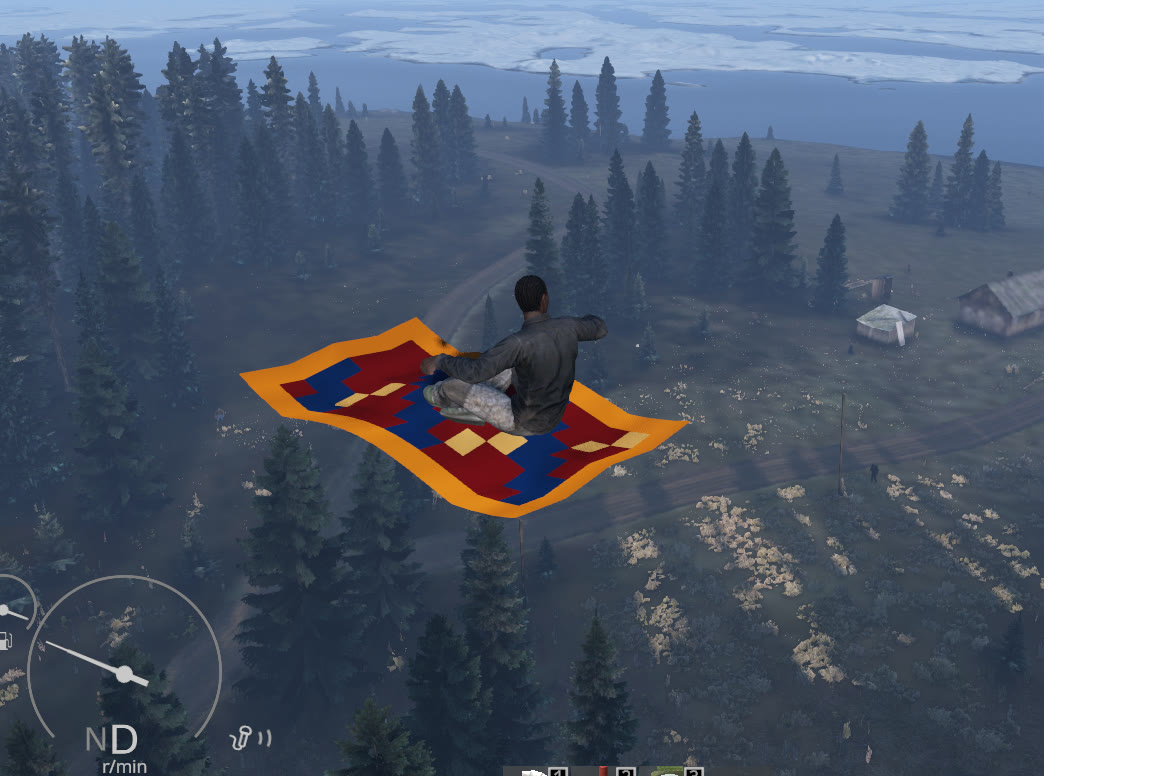
Flying Carpet — 0.2.0 Flying Carpet is a single-seat flying vehicle for DayZ. Physical inventory: 10 × 50 (500 cells). Server owners can tune speed, acceleration, braking, turning, vertical movement and the permitted occupied cargo cells. Installation Subscribe and load this mod on both client and server. Add its folder to the server -mod list, copy the supplied keys/*.bikey into the server keys folder, and use the… (more)
Flying Carpet — 0.2.0 Flying Carpet is a single-seat flying vehicle for DayZ. Physical inventory: 10 × 50 (500 cells). Server owners can tune speed, acceleration, braking, turning, vertical movement and the permitted occupied cargo cells. Installation Subscribe and load this mod on both client and server. Add its folder to the server -mod list, copy the supplied keys/*.bikey into the server keys folder, and use the identical Workshop release on both sides. Preserve existing mission persistence when upgrading. Spawn class: DF_FlyingCarpet The mod does not add trader entries or automatic economy spawns; configure your admin spawn tool, trader or economy separately using that class. Load this public release OR its test branch, never both: they share vehicle classes. Remove the test entry from the launch list when switching; do not delete stored vehicles. Controls Use your DayZ vehicle bindings: select a forward gear and use throttle to travel forward, reverse gear plus throttle to reverse, steering to turn, and brake to slow down. Vehicle Turbo raises the craft; Vehicle Slow lowers it (normally Left Shift / Left Ctrl; check your own bindings). Start and stop the engine with the normal vehicle action. Land and stop the engine before leaving. Terrain protection limits descent near the ground. Optional CarLock TraderPlus CarLock is optional. With that system enabled, use its normal lock/code actions. This mod enforces the locked state for cargo, attachments, entry and engine start; X-Wing also protects the canopy. Unlock before use. Locking a running craft stops its engine and invokes its existing engine-off landing behavior. The mod does not include or replace TraderPlus itself. Server JSON configuration The server generates this file on its first startup with the mod: $profile:DigitalFrontier/Flight/FlyingCarpet.json $profile means the directory selected by the server's -profiles argument, not the mod folder or your client profile. For example, with -profiles=/srv/dayz/profiles the file is /srv/dayz/profiles/DigitalFrontier/Flight/FlyingCarpet.json. Every server instance has its own profile/settings. 1. Start the server once to generate the file, then stop it gracefully. 2. Back up the JSON and open it in a plain-text editor. Keep SchemaVersion at 1. 3. Edit the numeric values below. Use decimal points, quoted field names and valid JSON; do not add comments or trailing commas. 4. Save and restart the server. Settings load once per process and synchronize to clients. Client-side JSON edits have no effect. Defaults: { "SchemaVersion": 1, "InventoryCapacitySlots": 500, "TopSpeedKmh": 145, "ReverseSpeedKmh": 28.8, "AccelerationMps2": 10, "ReverseAccelerationMps2": 10, "DirectionBrakeMps2": 22, "ServiceBrakeMps2": 8, "CoastBrakeMps2": 3, "VerticalAccelerationMps2": 14, "TurnRateRadiansPerSecond": 1.4, "AscendSpeedMps": 12, "DescendSpeedMps": 10 } Fields (default; accepted range): - InventoryCapacitySlots: maximum occupied inventory grid cells; default 500; 0..500. - TopSpeedKmh: maximum forward speed (km/h); default 145; 1..180. - ReverseSpeedKmh: maximum reverse speed (km/h); default 28.8; 0..100. - AccelerationMps2: forward acceleration (m/s²); default 10; 0.1..60. - ReverseAccelerationMps2: reverse acceleration (m/s²); default 10; 0.1..60. - DirectionBrakeMps2: braking when changing travel direction (m/s²); default 22; 0.1..80. - ServiceBrakeMps2: brake-input deceleration (m/s²); default 8; 0.1..80. - CoastBrakeMps2: deceleration with no throttle (m/s²); default 3; 0.1..30. - VerticalAccelerationMps2: vertical acceleration response (m/s²); default 14; 0.1..60. - TurnRateRadiansPerSecond: maximum yaw rate (radians/second); default 1.4; 0.1..3. - AscendSpeedMps: maximum upward speed (m/s); de
Not analyzed yet
modperf has not read this mod's scripts, so there is no report and it is left out of any stack it appears in. 2 live servers in the crawl publish it.
The worker downloads the mod from the Workshop and reads its Enforce Script — nothing is executed. Usually a few minutes. This page then shows the report.