FEDOT SmartSlotVisuals
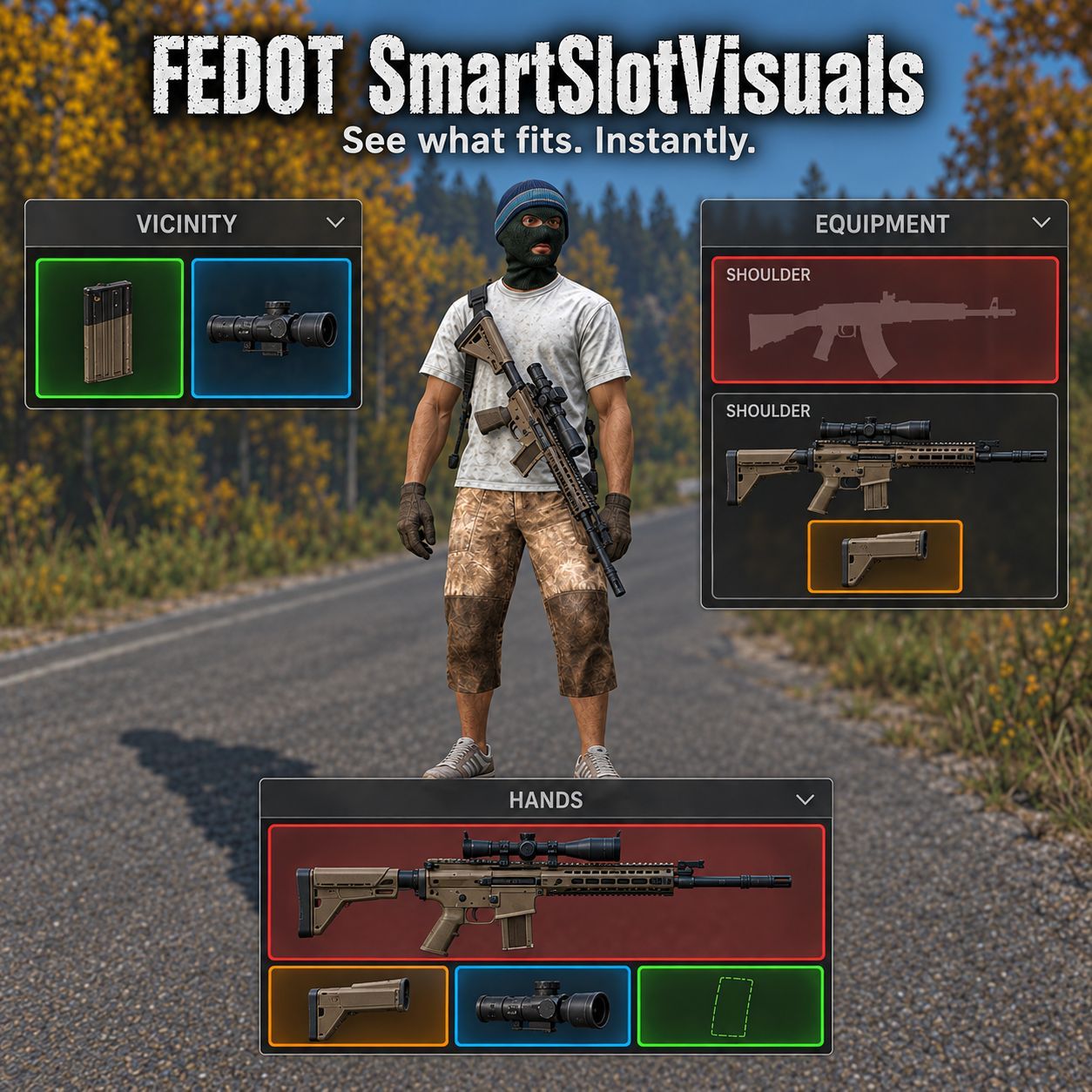
FEDOT Smart Slot Visuals A simple and convenient way to see compatible items in DayZ. FEDOT Smart Slot Visuals helps you quickly understand which items work together. Hold an item in your hands and open the inventory — compatible items and attachment slots will be highlighted automatically. No more checking every magazine, optic, suppressor, stock, attachment, or piece of equipment manually. Українська Тримайте… (more)
FEDOT Smart Slot Visuals A simple and convenient way to see compatible items in DayZ. FEDOT Smart Slot Visuals helps you quickly understand which items work together. Hold an item in your hands and open the inventory — compatible items and attachment slots will be highlighted automatically. No more checking every magazine, optic, suppressor, stock, attachment, or piece of equipment manually. Українська Тримайте предмет у руках і відкрийте інвентар — мод автоматично підсвітить сумісні предмети та слоти. Підтримуються зброя, магазини, модулі, спорядження, контейнери, транспорт, об'єкти будівництва та предмети поблизу. Русский Возьмите предмет в руки и откройте инвентарь — мод автоматически подсветит совместимые предметы и слоты. Поддерживаются оружие, магазины, модули, экипировка, контейнеры, транспорт, объекты постройки и предметы поблизости. HOW IT WORKS: 4-COLOR SYSTEM The mod uses a dynamic four-color scheme with mutual highlighting. When you hover over an item, linked elements dynamically brighten and receive a soft color fill. If an item can be used in multiple ways, priority is applied: Green → Cyan → Red → Orange. GREEN HIGHLIGHT The highlighted item is compatible and can be attached to the item in your hands right now. For example: a magazine that fits your weapon; a compatible optic, suppressor, stock, or handguard; ammunition suitable for your weapon or magazine; another compatible attachment. CYAN HIGHLIGHT The highlighted item potentially fits, but you may need to free up a slot first (highlights alternative options for currently occupied slots). RED HIGHLIGHT The item in your hands can be attached to the highlighted item or placed into the highlighted slot right now. ORANGE HIGHLIGHT Potential attachment location, but the action is currently unavailable. Note: Potential highlights (Cyan/Orange) do not guarantee immediate attachment. FEATURES Works seamlessly with vanilla and modded items. Bidirectional deep checking: evaluates the item in your hands and its nested contents (e.g., checking a magazine inside a backpack you are holding). Four-color scheme with mutual highlighting on hover. Supports weapons, magazines, ammunition, and ammo boxes. Supports clothing, equipment, and player slots. Supports vehicle slots and base-building objects. Checks items in your inventory, equipment, and the Vicinity panel. Checks nested containers and installed attachments. Updates instantly and reliably when items are moved, attached, detached, or swapped. Transparent overlays for reserved slots improve UI readability. Heavily optimized recalculation caching and client cache integrity checks. Continues working after leaving and rejoining a server. Does not change standard DayZ inventory controls or drag-and-drop behavior. MODDED CONTENT SUPPORT The mod is designed to work automatically with compatible content from other mods. This includes: modded weapons; modded magazines; modded weapon attachments; modded clothing and equipment; modded containers; other compatible inventory items. No manual item compatibility list is required. SERVER INSTALLATION Add the mod to the server and client -mod launch parameter. No additional dependencies are required. On the first server start, the mod creates its files in: FEDOT_SmartSlotVisuals The default settings are suitable for normal use. SERVER SETTINGS Server owners can find the configuration file here: FEDOT_SmartSlotVisuals\settings.json The file includes descriptions for every option. 1 = enabled 0 = disabled HighlightEvenIfNoSpace Enabled by default. Wh
Not analyzed yet
modperf has not read this mod's scripts, so there is no report and it is left out of any stack it appears in. 4 live servers in the crawl publish it.
The worker downloads the mod from the Workshop and reads its Enforce Script — nothing is executed. Usually a few minutes. This page then shows the report.