Reborn Killfeed
Reborn Killfeed A clean, animated killfeed for DayZ. Every kill (players and AI survivors) appears in the top-right corner for everyone on the server, showing the killer, the weapon they used (with their real attachments), the victim, the distance, a headshot icon and a consecutive-kill counter. Server owners can give custom name styles to individual players. Players pick a name color, an entrance animation and a… (more)
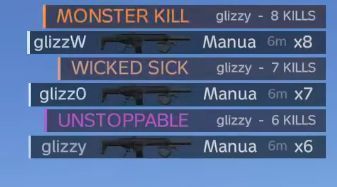
Reborn Killfeed A clean, animated killfeed for DayZ. Every kill (players and AI survivors) appears in the top-right corner for everyone on the server, showing the killer, the weapon they used (with their real attachments), the victim, the distance, a headshot icon and a consecutive-kill counter. Server owners can give custom name styles to individual players. Players pick a name color, an entrance animation and a row background, and everyone on the server sees that style on their kills. Features Compact killfeed that sizes each line to its content, anchored top-right 3D weapon preview showing the killer's actual attachments (optics, stocks, handguards, magazines...) Headshot icon, distance and an x1 / x2 / x3 consecutive-kill counter Killstreak announcements in the feed: KILLING SPREE, DOMINATING, MEGA KILL, UNSTOPPABLE, WICKED SICK, MONSTER KILL, LUDICROUS KILL, GODLIKE, HOLY SHIT 35 name entrance animations (Swipe, Slam, Glitch, Decode, Typewriter, Warp Speed, Teleport...) 46 name colors: 23 solid colors plus animated ones like RGB Cycle, Inferno, Hologram, Aurora and Thermal 16 animated row backgrounds (Scanner, Lightning, Charge Up, Neon Edge, Ember...) Live preview of your style in the settings menu For players If the server gave you styles, open the style menu with the KILLFEED button in the Esc menu or with the Killfeed settings key (F6 by default, rebindable under Options > Controls > Killfeed). Pick a name color, an entrance and a background, then press SAVE. For server owners Installation Add the mod to your server and to your clients' mod list (it must be loaded on both). Start the server once. The mod creates its files in Profiles\Reborn_Killfeed\. Coming from an older version? Your configs in Profiles\Killfeed\ are moved to the new folder automatically. Files Reborn_KillfeedPermission.json - who gets styles, by Steam64 ID. This is the file you edit most. Reborn_KillfeedPresets.json - settings and all available styles. Reborn_KillfeedHelp.json - an explanation of every option, written by the server on each start. It also lists every style ID available on your server. Giving a player styles Add a block to "Players" in Reborn_KillfeedPermission.json: { "PlayerUID": "76561198012345678", "Note": "Store order 1234", "AllStyles": true, "ExpiresOn": "" } AllStyles - every style, including styles added in future updates AllAnimations / AllColors / AllBackgrounds - every style of one kind AnimationIds / ColorIds / BackgroundIds - hand-picked styles, e.g. "ColorIds": ["rgb", "inferno"] ExpiresOn - last day of access (YYYY-MM-DD) for time-limited packs, empty = permanent The file is re-read every 60 seconds, so new edits work without a restart. Players without an entry get the plain look and no style menu. The server checks every permission itself, so styles cannot be unlocked from the client. Settings (Reborn_KillfeedPresets.json) Turn name colors, entrances, backgrounds, killstreak announcements and the kill counter on or off individually Choose how players open the style menu: the Esc menu button, the hotkey, or both FeedScale to make the killfeed smaller or bigger for everyone Optional message for players without styles (e.g. a link to your store) Edit, rename or add your own styles and killstreak titles Your edits are safe The mod never overwrites a config file it cannot read. If a file has a typo, the error is written to the server log, and the file stays as it is until you fix it. When an update adds new options, your previous file is kept as a backup. Permissions Repacking, reuploading or editing thi
Not analyzed yet
modperf has not read this mod's scripts, so there is no report and it is left out of any stack it appears in. 4 live servers in the crawl publish it.
The worker downloads the mod from the Workshop and reads its Enforce Script — nothing is executed. Usually a few minutes. This page then shows the report.