Zellno Combo Lock
ZELLNO COMBO LOCK Zellno Combo Lock provides an electronic password system for its custom vanilla-derived four-dial combination lock. Instead of rotating the physical lock dials, players configure and enter a numeric password through a dedicated interface. After entering the correct password once, the player is remembered by that individual lock and can open or close the protected structure without entering the… (more)
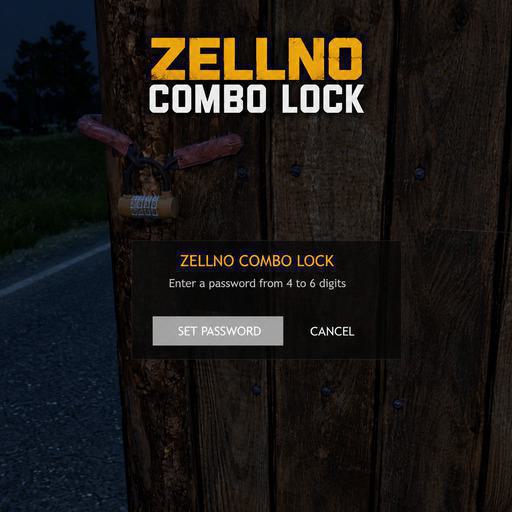
ZELLNO COMBO LOCK Zellno Combo Lock provides an electronic password system for its custom vanilla-derived four-dial combination lock. Instead of rotating the physical lock dials, players configure and enter a numeric password through a dedicated interface. After entering the correct password once, the player is remembered by that individual lock and can open or close the protected structure without entering the password again. FEATURES Dedicated Zellno combination-lock classname Electronic password interface Visible numeric passwords from 4 to 6 digits Server-side password validation Per-lock authorized-player memory Authorization persistence across server restarts Instant Open (Zellno) and Close (Zellno) actions for authorized players Safe lock removal with pliers Analog dial actions hidden while a configured Zellno lock is attached Original structure actions restored after lock removal No modification of the vanilla CombinationLock4 classname HOW TO USE Attach Zellno_CombinationLock4 to a supported door or gate. Look at the protected structure and select Set Password (Zellno). Enter a numeric password containing 4 to 6 digits. Confirm the password by selecting SET PASSWORD. After configuration, use Open (Zellno) and Close (Zellno). A newly attached lock is not fully configured until a password has been set. Before initial configuration, the lock can be removed with pliers. This allows the owner to recover a lock that was attached accidentally or left without a password. After configuration, an unknown player must select Enter Password (Zellno) and provide the correct password. Once authorized, that player is remembered by that individual lock. Authorization applies only to the specific lock that accepted the password. It does not automatically authorize the player on other Zellno locks. DAYZ 1.30 COMPATIBILITY Zellno Combo Lock has been updated for DayZ 1.30. The update adapts the combination-lock unlocking logic to the DayZ 1.30 API while preserving the existing electronic password system and authorized-player memory. Local validation on DayZ 1.30 includes: Password configuration Password validation Vanilla Fence locking and unlocking RaG Hunting Cabin interactions Lock removal and reinstallation Authorized-player persistence after server restart Additional two-player multiplayer validation specifically for DayZ 1.30 remains pending. VALIDATED COMPATIBILITY The following structures and integrations have been tested during development: Vanilla Fence gates RaG BaseBuilding doors and gates RaG Hunting Cabin normal and admin variants TraderPlus CarLock coexistence on validated structures Compatibility may vary after future DayZ or third-party mod updates. RAG COMPATIBILITY Support for RaG BaseBuilding and RaG Hunting Cabin is included in the standard Workshop installation. All required PBOs and signatures are already located in the mod's addons folder: ZellnoComboLock.pbo ZellnoComboLock.pbo.Zellno.bisign ZellnoComboLock_RaGCompat.pbo ZellnoComboLock_RaGCompat.pbo.Zellno.bisign No manual file transfer or additional compatibility installation is required. Do not move, rename or duplicate these files. When using RaG mods, load them before Zellno Combo Lock. BASEBUILDINGPLUS COMPATIBILITY Zellno Combo Lock has not yet been tested with BaseBuildingPlus (BBP). Compatibility with BBP doors, gates and other lockable structures is currently not guaranteed. Server owners should not assume BBP support until dedicated compatibility testing has been completed. SERVER INS
Not analyzed yet
modperf has not read this mod's scripts, so there is no report and it is left out of any stack it appears in. 1 live server in the crawl publishes it.
The worker downloads the mod from the Workshop and reads its Enforce Script — nothing is executed. Usually a few minutes. This page then shows the report.