Persistent Bodies
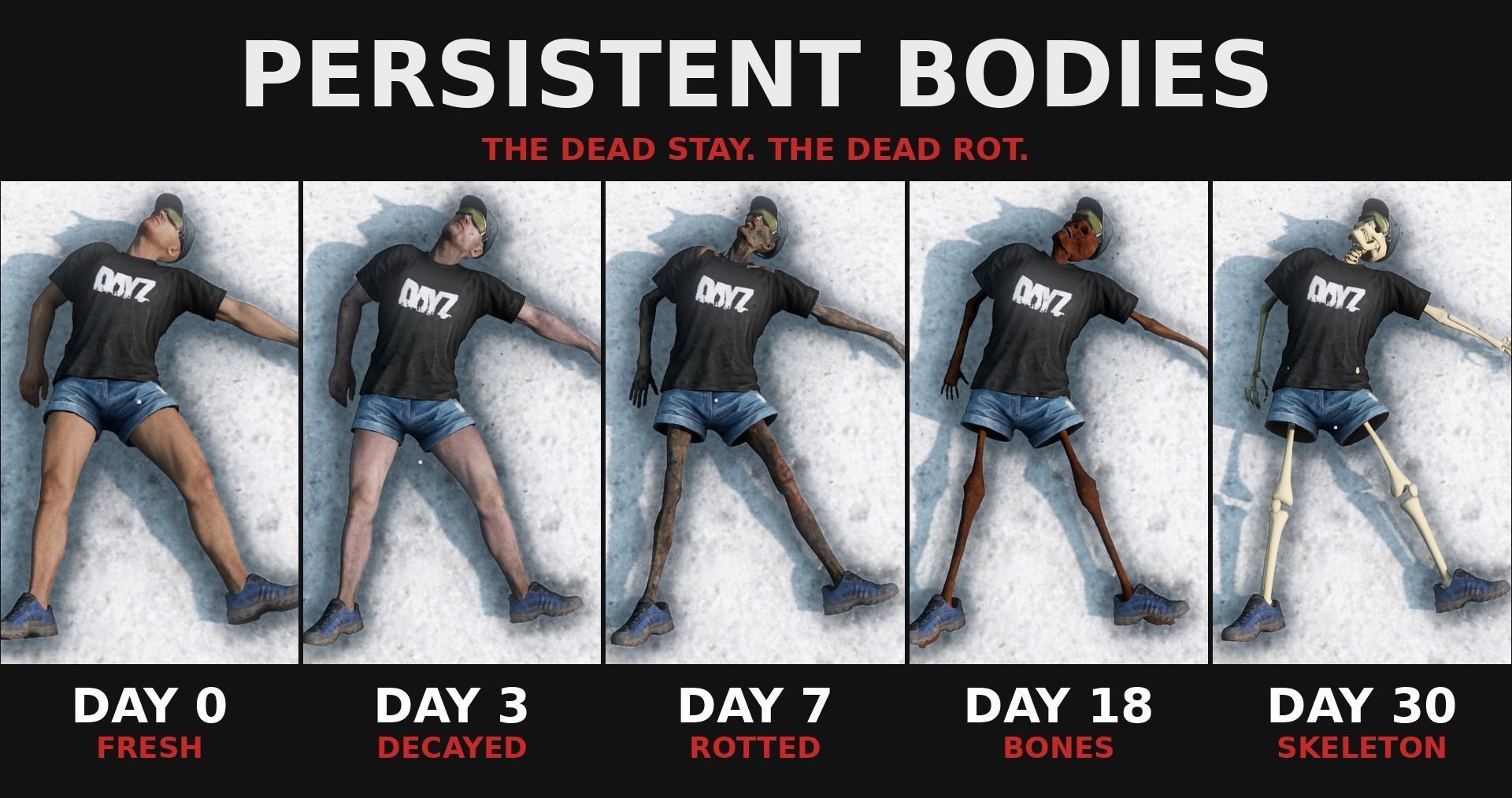
PersistentBodies Dead players don't vanish anymore. Their bodies stay where they fell, through restarts, with all their gear, and slowly rot away over real days. What happens to a body 0-7 days: the real body, same face and clothes, fully lootable. Gets flies after 1 day and looks decayed after 3. 7 days: a rotted, mummified body. 18 days: almost a skeleton. 30 days: a skeleton. You can take its skull as a memento:… (more)
PersistentBodies Dead players don't vanish anymore. Their bodies stay where they fell, through restarts, with all their gear, and slowly rot away over real days. What happens to a body 0-7 days: the real body, same face and clothes, fully lootable. Gets flies after 1 day and looks decayed after 3. 7 days: a rotted, mummified body. 18 days: almost a skeleton. 30 days: a skeleton. You can take its skull as a memento: "Skull of <name>", with how long they survived. A hat, mask or glasses on the skeleton come along with the skull. Every stage keeps the gear and stays lootable. Looting is saved. A body is gone for good only when it's really removed from the world. Works with Dogtags (Wardog): if it's loaded, a dead player's dogtag keeps its name and date on the body. Not required. Install (server owners) Start line: -mod=@PersistentBodies (one mod for server and players; players get it from the Workshop). Copy the .bikey from @PersistentBodies\keys into your server's keys folder. Add the PB_Skull entry from types_PersistentBodies.xml (in the mod folder) to your mission's db/types.xml, or loose skulls get cleaned up. Settings <profiles>\PersistentBodies\settings.json is written on the first start: streamBodies (1): only spawn bodies when a player is near. 0 = every body is always in the world. spawnRadius (300 m), despawnRadius (300 m), despawnAfterSeconds (60) neverRemoveWithin (50 m, can't go lower): a body is never removed while someone this close is alive. maxSpawnsPerCheck (10), checkEverySeconds (5) keepAIBodies (0): bodies of AI / bots (for example DayZ-Expansion AI) are not kept. 1 = keep them too. minAliveMinutes (0): only keep a player's body if that character lived at least this many minutes (for example 10, so fresh-spawn deaths on the coast are not kept). Saved bodies: <profiles>\PersistentBodies\bodies.json (with a .bak backup). Stop the server before editing it by hand, and save it as UTF-8 without BOM. Changelog v1.0.1 Fixed: a random respawn could spawn you as a rotted / almost-skeleton / skeleton body. Fixed: launchers showed "Workshop ID 0". New setting keepAIBodies (default 0): AI / bot bodies (for example DayZ-Expansion AI) are no longer kept. New setting minAliveMinutes (default 0): only keep bodies of characters that lived at least this long. Coming next Food and other perishables slowly spoil on the body. Even more items keep exactly their state on the body. Every item and everything attached to it comes back right, all the way down. The skull keeps its owner when you travel with Map Link to another server or map. Clothes that hang on the bones instead of floating around rotted bodies and skeletons. A special death pose for players who die from a long fall. More tests to keep the mod and your server healthy. Optional (off by default): zombie bodies stay too, and rot to bones faster than players. Credits Rotted body: "Zombie_Smoke_Mummy_Character_12_MB" by Mehdi Shahsavan, CC BY 4.0, https://sketchfab.com/3d-models/zombie-smoke-mummy-character-12-mb-855ade268167415e954f4377ed4519c5 (changed: rigged to the DayZ skeleton, reduced, retextured).
Not analyzed yet
modperf has not read this mod's scripts, so there is no report and it is left out of any stack it appears in. 11 live servers in the crawl publish it.
The worker downloads the mod from the Workshop and reads its Enforce Script — nothing is executed. Usually a few minutes. This page then shows the report.